
All Six Languages
Choose the Elements language you know best, select the language whose features suit the task, or mix languages in the same project.
Elements Platforms
Build WebAssembly apps that run natively in the browser with Elements languages.

Elements' WebAssembly platform allows you to build apps that run client-side natively in the web browser on Node.js.
WebAssembly, or WASM, is a platform for client-side web development: code that runs in the local browser on the end user's system rather than on the server. It does not replace JavaScript, but works alongside it and within the same browser environment.
While JavaScript is interpreted or JIT-compiled locally in the browser, WebAssembly projects compile to binary code before you deploy them, much like a .NET or native executable would. This allows the code to be written in languages other than JavaScript.
You can read more in our WebAssembly: A Primer blog post, watch the webinar replay below, or visit webassembly.org.
Use the language and APIs that fit your project, then compile everything into a deployable .wasm module.
Choose the Elements language you know best, select the language whose features suit the task, or mix languages in the same project.
Use Island RTL and the optional Elements RTL to share suitable code across WebAssembly and the other Elements platforms.
Access the objects exposed by the browser, work directly with the HTML DOM, call JavaScript, and let JavaScript call back into your WebAssembly code.
Your project compiles into a .wasm binary containing code for the virtual WebAssembly CPU. The resulting module is straightforward to deploy, designed for efficient browser execution, and does not require you to ship your original source code to the client.
JavaScript is a dynamic language, and much of the browser API and DOM is dynamic as well. Calls are not verified, and invalid code might not fail until it runs.
Elements provides strongly typed wrappers for most of these APIs. You get Code Completion and other IDE assistance as you work, can see which methods are available, and receive clear compile-time errors for invalid code even when working with browser and DOM APIs.
The toolchain also provides an optional CodeBehind model, similar to WPF on .NET. Elements from your HTML page are exposed to code as strongly typed properties and can be accessed without manual DOM lookup. Simply giving an HTML element an id is enough.
That lets your code address a control directly, for example: okButton.innerText := "Click Me".
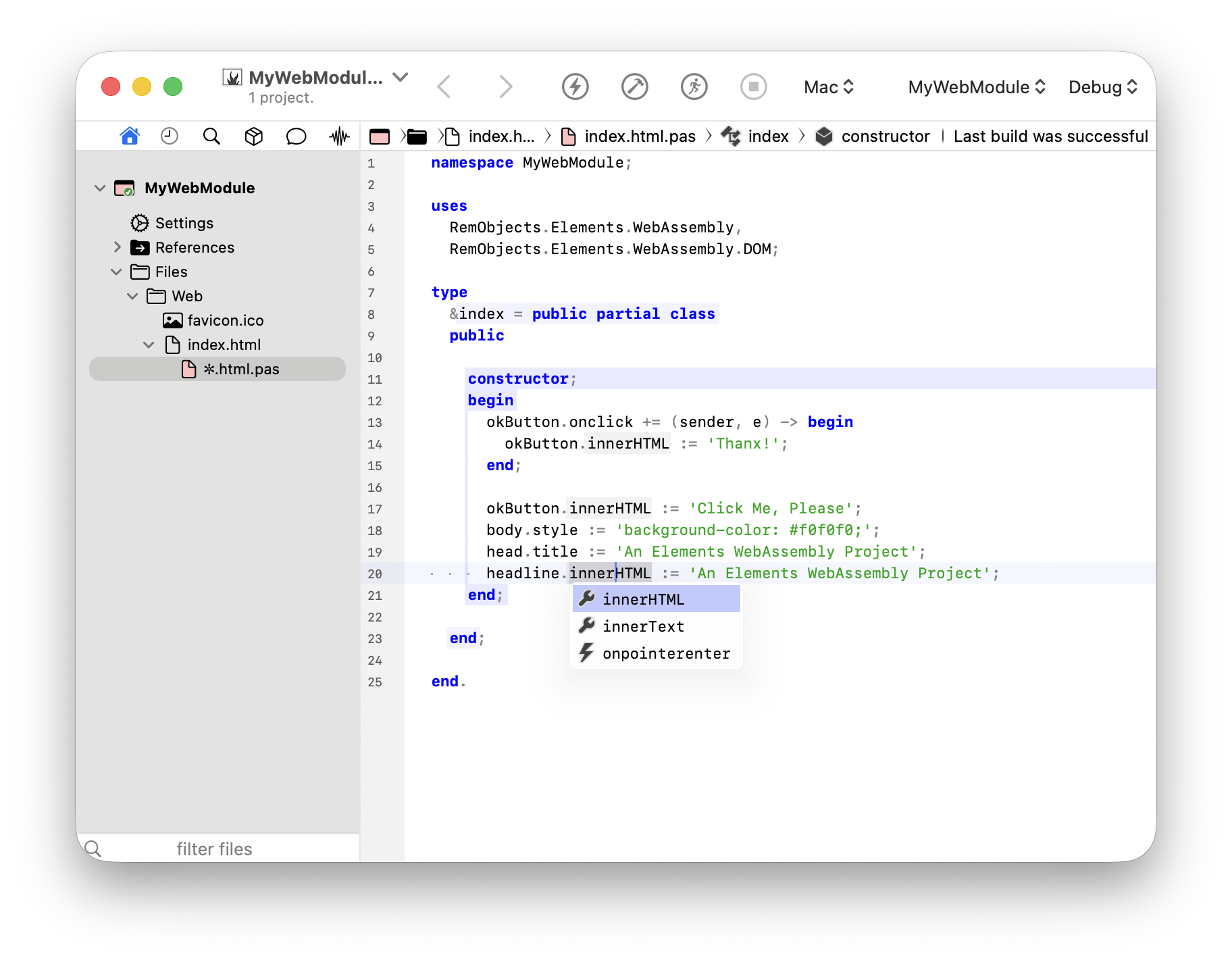
Writing code is only half the story. Elements includes a WebAssembly debug engine that works with modern Chromium browsers, letting you run, test, and debug your project with breakpoints, stepping, variable inspection, and the other tools you expect.
WebAssembly is best known for code that runs client-side in the browser, but it is also at home in Node.js, where JavaScript and WebAssembly are commonly used for server-side functionality.
Elements provides full support for creating modules that run on Node.js. Just like browser modules, Node.js modules can access the APIs provided by the runtime, with many of them exposed through strongly typed interfaces for Code Completion and compile-time error checking.
You can read more about the runtime at nodejs.org.