

Schema Modeler
One of the pillars of Data Abstract is its use of schemas to abstract the structure and type of the back-end database away from the code in client and middle tier, as described in more detail here.
To make the task of defining and maintaining schemas easy and comfortable, Data Abstract includes the Schema Modeler application, which integrates with the Visual Studio and Delphi IDEs, but can also be used standalone.
Schema Modeler has been designed from the ground up to be usable both by the developers implementing the middle (and possibly client) tier, as well as database administrators or architects that only want to define the schemas that later will be coded against by other members of the development team.
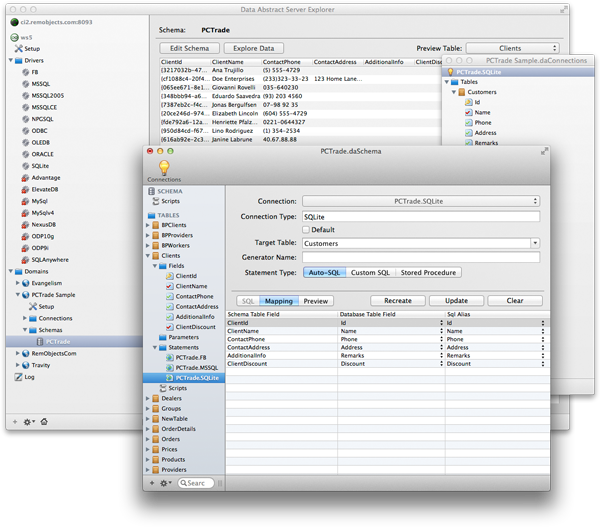
Schema Modeler is available on Windows and Mac, and both versions have been designed from the ground up to be native apps that fit in with the platform.
Tasks typically performed in Schema Modeler include:
- Define connections against the real back-end databases, using any of the many drivers supported by Data Abstract.
- Browse tables, views and stored procedures available on the back-ends.
- Define data tables to expose as part of the schema, via drag and drop or by manually configuring the tables as desired.
- Where needed, configure column mappings to define how fields from data tables map to differently-named fields in the back-end.
- Configure mappings of data tables to differently-named tables in the back-end databases when targeting multi-database scenarios.
- Run and test data tables against various back-ends to see if they are functioning as expected.
- Run the Validate Schema Wizard across the entire schema to ensure it is consistent and properly matches the back-end database or databases.
Schema Modeler Integration in Visual Studio
In Data Abstract for .NET, schemas are handled as separate files within a project, named with a .daSchema extension and linked into the compiled project as resources. Schema Modeler integrates with Visual Studio so that you can double-click .daSchema files right from Solution Explorer to open and edit the file.
This extends to client applications written in .NET, as well as Java or Cocoa (using Oxygene and RemObjects C#), where .daRemoteSchema and .relativityClient files in your project make the connection to your schema(s).
.daRemoteSchema and .relativityClient files can also be added to your Xcode projects to launch Schema Modeler for Mac as needed.
Schema Modeler Integration in Delphi
In Data Abstract for Delphi, schemas are handled through TDASchema components dropped on forms or data modules that contain the schema definition within and store it as part of the DFM. IDE integration allows you to double-click a TDASchema component to launch Schema Modeler and edit the schema.
You can also right-click a TDASchema component to load or save the schema from/to a .daSchema file - making it easy to exchange schema information with Visual Studio projects or to import a schema received from a database architect.
Using Schema Modeler Standalone
Schema Modeler can also be started standalone, either by running it from the Windows Start menu (Windows) or the Applications folder (Mac) or by double-clicking a .daSchema file in Windows Explorer or Finder. When run standalone, additional options for loading/saving schemas are available in the menu that are hidden when Schema Modeler was started from the IDE.
When run standalone, Schema Modeler also supports retrieving or publishing schemas directly from/to a running Relativity Server, including the support to work with live data through Relativity Server without a direct database connection.
Server Explorer
On Mac, Schema Modeler is integrated with the Server Explorer application that also lets you manage and administer Relativity Server instances.